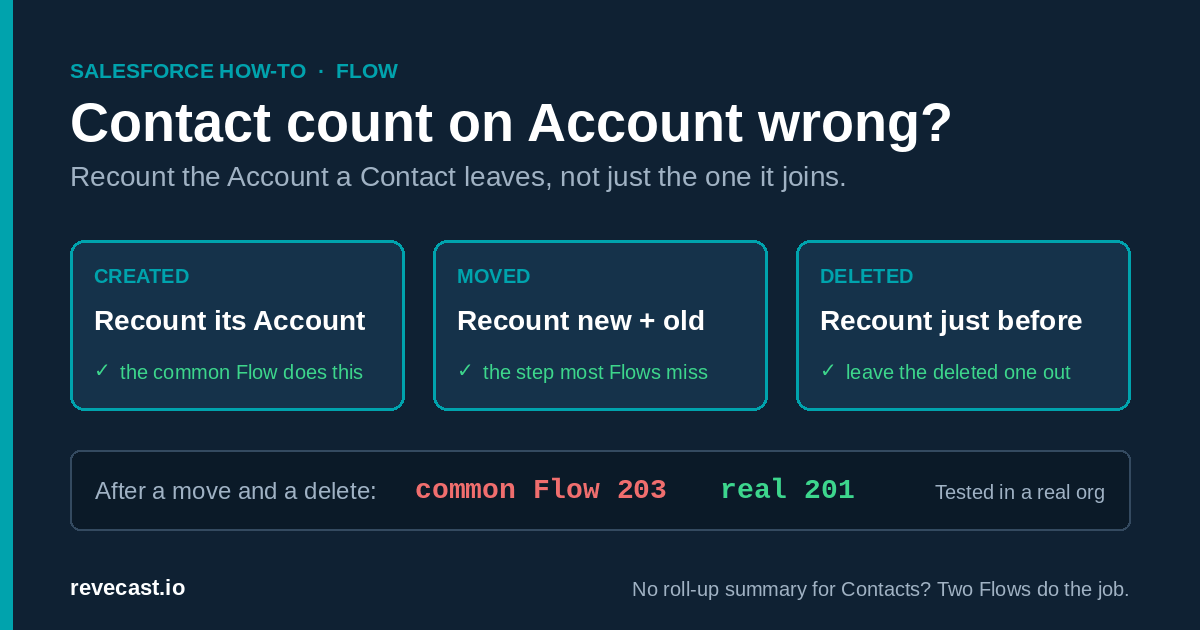
The short version: Salesforce can’t count an Account’s Contacts with a roll-up summary field, so most people build a Flow instead. The usual Flow counts new Contacts correctly but gets the number wrong as soon as a Contact is moved to another Account, taken off an Account, or deleted. The fix is two small Flows: one that recounts both the new and the old Account when a Contact changes Account, and one that recounts just before a Contact is deleted. Then run a one-time recount to fix the Accounts you already have.
Why there’s no roll-up summary for Contacts
A roll-up summary field adds up or counts records “underneath” another record. Salesforce only offers it when the two objects have a master-detail relationship, where the child can’t exist without the parent. Contacts are linked to Accounts by a looser lookup relationship (a Contact can have no Account at all), so Contacts never appear in the list when you create a roll-up summary on Account.
We tried to create one anyway through the Metadata API, and Salesforce refused:
Custom Object Definition ID: bad value for restricted picklist field: ContactSo a number field kept up to date by Flow is the standard answer. The question is which Flow.
The common Flow, and where it goes wrong
Salesforce’s own Help article, “Salesforce Platform Flow: Count Contacts and Update Account Field” (article 000395389), describes a record-triggered Flow on Contact that runs when a Contact is created or updated, counts the Contacts on its Account, and writes the number to a field on the Account. Most community answers describe the same thing.
That Flow is fine for new Contacts. But it only ever looks at the Contact’s current Account, and it doesn’t run when a Contact is deleted. We built it exactly as described and compared it with the real number of Contacts at each step:
| What we did | Real count (A / B) | Common Flow (A / B) |
|---|---|---|
| Added 3 Contacts to Account A and 1 to Account B | 3 / 1 | 3 / 1 ✅ |
| Added 200 more Contacts to A in one save | 203 / 1 | 203 / 1 ✅ |
| Moved a Contact from A to B | 202 / 2 | 203 / 2 ❌ |
| Took a Contact off Account B (no Account) | 202 / 1 | 203 / 2 ❌ |
| Deleted a Contact from A | 201 / 1 | 203 / 2 ❌ |
Notice the pattern: the Account a Contact leaves is never recounted, so its number only ever goes up. Salesforce shows no error. The number is just quietly wrong, and it gets more wrong over time.
The fix: two Flows
First, create a Number field on Account, for example Number of Contacts, with 0 decimal places. Add help text saying it’s updated automatically, and give the right users read access to it.
Flow 1: when a Contact is created or changes Account
- Create a record-triggered Flow on Contact, triggered when a record is created or updated, optimized for Actions and Related Records (runs after the save).
- Set the entry condition to a formula so it only runs when it matters:
OR(ISNEW(), ISCHANGED({!$Record.AccountId})). Without this, the Flow runs on every edit to every Contact. - Add a Decision: does the Contact have an Account? If yes, Get Records for all Contacts with that Account, count them with an Assignment (operator “Equals Count”), and Update the Account’s Number of Contacts.
- Add a second Decision: did the Contact come from a different Account? The check is:
$Record__Prior.AccountIdis not empty, and it isn’t equal to$Record.AccountId. - If yes, do the same three steps for the old Account: get its Contacts using
$Record__Prior.AccountId, count them, and update that Account. This is the step the common Flow is missing.
Make sure both paths reach the second Decision, including the path where the Contact now has no Account. That’s the “taken off an Account” case.
Flow 2: just before a Contact is deleted
- Create another record-triggered Flow on Contact, triggered when a record is deleted. Salesforce runs delete Flows just before the record is removed.
- Entry condition: AccountId Is Null = False, so it skips Contacts with no Account.
- Get Records for Contacts where AccountId equals
$Record.AccountIdand Id does not equal$Record.Id. Leaving out the Contact being deleted matters, because it still exists while this Flow runs. - Count them with an Assignment and update the Account.
With both Flows active, the field matched the real count at every step of the same test:
| What we did | Real count (A / B) | Two-Flow fix (A / B) |
|---|---|---|
| Added 3 Contacts to A and 1 to B | 3 / 1 | 3 / 1 ✅ |
| Added 200 more to A in one save | 203 / 1 | 203 / 1 ✅ |
| Moved a Contact from A to B | 202 / 2 | 202 / 2 ✅ |
| Took a Contact off Account B | 202 / 1 | 202 / 1 ✅ |
| Deleted a Contact from A | 201 / 1 | 201 / 1 ✅ |
Fixing the Accounts you already have
These Flows only run when a Contact changes. Accounts that existed before you switched them on keep a blank or wrong number until one of their Contacts is touched. You need a one-time recount. Two ways:
- Without code: run a report of Contacts grouped by Account ID, export it, and load the counts into the Number of Contacts field with Data Loader or Data Import Wizard. Remember Accounts with no Contacts need a 0.
- With a short script: see the developer section below. We tested this one: we blanked the field on our test Accounts, ran the script, and got 201 and 1, matching the real counts.
Things to know
- Restoring from the Recycle Bin: record-triggered Flows can run on create, update and delete, but not on undelete. If someone restores a deleted Contact, its Account won’t be recounted until another of its Contacts changes. We didn’t test this case. If it happens often in your org, re-run the recount now and then.
- Very large Accounts: the Flows load every Contact on the Account to count them. That was fine at 203 Contacts. We didn’t test Accounts with tens of thousands of Contacts, where Flow limits could become a problem.
- Don’t let people edit the field. Make it read-only on the page layout, or the next Contact change will overwrite their edit anyway.
For developers: the recount script
This anonymous Apex recounts a set of Accounts with one aggregate query and one update. Change the WHERE clause to pick your Accounts, and for large orgs run it in batches or wrap it in Batch Apex.
Map<Id, Account> updates = new Map<Id, Account>();
for (Account acc : [SELECT Id FROM Account WHERE Name LIKE 'Your filter%']) {
    // Start every Account at 0, so Accounts with no Contacts are fixed too
    updates.put(acc.Id, new Account(Id = acc.Id, Number_of_Contacts__c = 0));
}
for (AggregateResult ar : [
        SELECT AccountId acc, COUNT(Id) n FROM Contact
        WHERE AccountId IN :updates.keySet() GROUP BY AccountId]) {
    updates.get((Id) ar.get('acc')).Number_of_Contacts__c = (Integer) ar.get('n');
}
update updates.values();
Use an aggregate query (COUNT(Id) ... GROUP BY AccountId), not a child subquery like (SELECT Id FROM Contacts). Our first version used the subquery and failed once an Account had more than 200 Contacts:
System.QueryException: Aggregate query has too many rows for direct assignment, use FOR loopTo check your counts afterwards, compare the field with a live count:
SELECT AccountId, COUNT(Id) FROM Contact GROUP BY AccountIdHow Revecast Orchestrate tested this
A Revecast Orchestrate session did all of this in a Salesforce Developer Edition test org on 2026-10-29 and 2026-10-30, through the API, with no clicks in Setup. It tried to create a roll-up summary on Account for Contacts and recorded the error above. It then deployed two Number fields on Account, a read-only permission set and three Flows: the Help-article version and the two-Flow fix, side by side. It created 2 test Accounts and 203 test Contacts, moved one Contact to another Account, took one off its Account and deleted one, reading back the real count and both fields after every step. Those readings are the tables above. It also tested the recount script on the same Accounts. Two of its own test scripts failed along the way, one on a reserved word and one on the 200-row subquery limit, and the second failure is why the developer section warns about it.
Got Salesforce automation that’s quietly wrong? Try Revecast Orchestrate free.
Reviewed by the Revecast Team. Tested in a live Salesforce org on 2026-10-30.