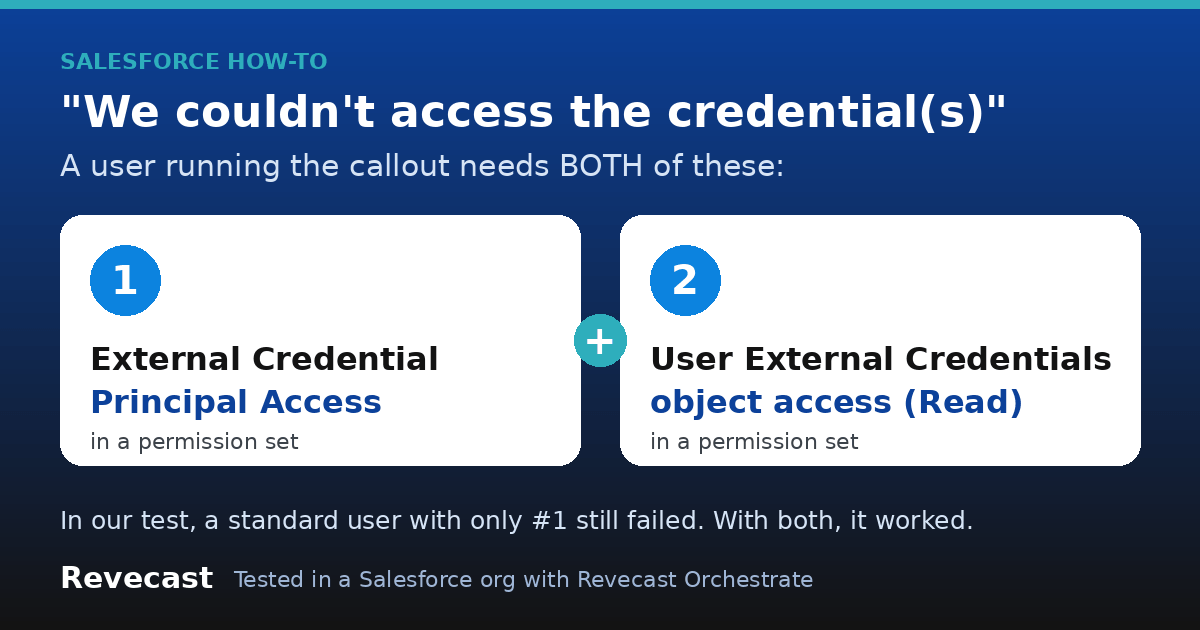
The short version: if a Named Credential callout works for you but fails for other users, an integration user or an automation with “We couldn’t access the credential(s). You might not have the required permissions, or the external credential might not exist”, the credential is usually fine. The user running the callout is missing permissions. Give that user a permission set with two things: External Credential Principal Access for the credential’s principal, and Read access to the User External Credentials object. In our test, a standard user with only the first one still failed, with a different error. With both, the callout worked.
Why it works for you and not for them
Since Salesforce moved Named Credentials onto External Credentials, a callout no longer works just because the Named Credential exists. Salesforce checks the user the code or flow is running as. As an admin you often have the access already, through System Administrator permissions or a permission set you gave yourself while setting things up. The other user doesn’t.
So the first job is to work out who is actually running the callout. It is often someone you don’t expect:
- A screen flow, Lightning component or button: the logged-in user, including Experience Cloud users.
- A platform event trigger, or a flow started by a platform event: the Automated Process user, unless you set a different running user.
- A scheduled or batch job: the user who scheduled or started it.
- An integration calling into Salesforce that then makes a callout: the integration user it logs in as.
The fix, step by step
- In Setup, open Named Credentials, go to the External Credentials tab and open the External Credential your Named Credential uses. Note the name of its Principal.
- Open (or create) a permission set for the users who make this callout. Go to External Credential Principal Access, click Edit, and add that principal.
- In the same permission set, go to Object Settings, open User External Credentials, and give it Read.
- Assign the permission set to the user who runs the callout (see the list above). For a platform event trigger, either assign it to the Automated Process user or set the trigger to run as a named integration user and assign it to that user.
- Run the callout again as that user.
If the error changes to “You don’t have read permissions on the User External Credential object”, step 2 worked but step 3 is missing or not assigned to the right user.
What we saw in a real org
We set up one Named Credential and made the same callout as two different users: a standard user on the Minimum Access – Salesforce profile, and the Automated Process user that platform event triggers run as by default. Here are the results, word for word:
| Permissions given | Standard user | Automated Process user |
|---|---|---|
| None | Failed: We couldn’t access the credential(s)… | Failed: We couldn’t access the credential(s)… |
| Principal Access only | Failed: You don’t have read permissions on the User External Credential object. | Worked (HTTP 200) |
| Principal Access + User External Credentials Read | Worked (HTTP 200) | Worked (HTTP 200) |
The two errors in full, as Salesforce returned them (OrchTest_Echo_Cred was our test credential’s name):
System.CalloutException: We couldn't access the credential(s). You might not have the required permissions, or the external credential "OrchTest_Echo_Cred" might not exist.

System.CalloutException: You don't have read permissions on the User External Credential object.
Two things stand out. The error you get first doesn’t mention the second permission at all, so fixing the first one can look like it made things worse. And the Automated Process user worked with Principal Access alone, while the standard user didn’t. We didn’t dig into why. Give both permissions and you don’t need to care.
Things to know
- The wording says “might not exist”, but check permissions first. In our test the credential existed the whole time. The same error appeared purely because of missing permissions.
- We tested a Named Principal. Our External Credential used one shared login for everyone (a Named Principal). If yours uses Per User authentication, each user also has to authenticate themselves, and we didn’t test that case.
For developers: doing it in metadata
This is the permission set we deployed. One permission set holding both grants is the simplest thing to assign:
<?xml version="1.0" encoding="UTF-8"?>
<PermissionSet xmlns="http://soap.sforce.com/2006/04/metadata">
    <label>Callout - My Service</label>
    <externalCredentialPrincipalAccesses>
        <enabled>true</enabled>
        <!-- ExternalCredentialName-PrincipalName -->
        <externalCredentialPrincipal>My_External_Cred-MyPrincipal</externalCredentialPrincipal>
    </externalCredentialPrincipalAccesses>
    <objectPermissions>
        <allowCreate>false</allowCreate>
        <allowDelete>false</allowDelete>
        <allowEdit>false</allowEdit>
        <allowRead>true</allowRead>
        <modifyAllRecords>false</modifyAllRecords>
        <object>UserExternalCredential</object>
        <viewAllRecords>false</viewAllRecords>
    </objectPermissions>
</PermissionSet>
To make a platform event trigger run as a named integration user instead of Automated Process, deploy a PlatformEventSubscriberConfig, then assign the permission set to that user:
<?xml version="1.0" encoding="UTF-8"?>
<PlatformEventSubscriberConfig xmlns="http://soap.sforce.com/2006/04/metadata">
    <batchSize>1</batchSize>
    <masterLabel>MyTriggerConfig</masterLabel>
    <platformEventConsumer>MyEventTrigger</platformEventConsumer>
    <user>integration.user@yourcompany.com</user>
</PlatformEventSubscriberConfig>
In Apex, catch System.CalloutException and log the message with UserInfo.getUserName(). The message tells you which of the two permissions is missing, and the username tells you who needs it:
HttpRequest request = new HttpRequest();
request.setEndpoint('callout:My_Named_Credential/some/path');
request.setMethod('GET');
try {
    HttpResponse response = new Http().send(request);
    System.debug(response.getStatusCode());
} catch (System.CalloutException calloutError) {
    System.debug(UserInfo.getUserName() + ': ' + calloutError.getMessage());
}
How Revecast Orchestrate tested this
A Revecast Orchestrate session did this in a Salesforce Developer Edition test org on 2026-10-30, through the API, with no clicks in Setup. It deployed a Named Credential and an External Credential (one Named Principal, pointing at a public echo service), two permission sets that each granted only one of the two permissions, a small Apex callout that logged who ran it and what came back, and a platform event with two triggers: one running as a test user on the Minimum Access – Salesforce profile, and one running as the default Automated Process user. It ran the callout three times, adding one permission set each round, and read the logged results back with a query after each round. Those readings are the table above. Afterwards it removed everything it had added and deactivated the test user. It didn’t test Per User principals or the Setup screens themselves, so the click path above follows Salesforce’s screen names rather than a recorded run.
Fighting Salesforce permissions that only break for other users? Try Revecast Orchestrate free.
Reviewed by the Revecast Team. Tested in a live Salesforce org on 2026-10-30.